
For modern engineering and design undergraduates, university life often feels like a constant juggling act. On one hand, you have the theoretical foundational knowledge—math, physics, and material science—that underpins the entire discipline. On the other hand, you are expected to master powerful, industry-standard CAD (Computer-Aided Design) software that translates theory into reality. The biggest challenge isn’t necessarily understanding the concepts, but navigating the complex software while simultaneously managing a mountain of assignment deadlines.
This dual pressure often leaves students stretched thin. Mastering intricate tools like SolidWorks or AutoCAD requires significant time investment, often at the expense of other coursework or crucial research. In an ideal world, software proficiency would grow naturally alongside your studies. In reality, the learning curve is often steep and demanding, potentially leading to burnout or compromised grades across the board. It’s during these crunch times that many students explore alternative support systems, such as an online assignment solution, to gain a valuable academic edge and effectively balance their academic workload. Seeking ethical academic assistance isn’t about cutting corners; it’s about smart resource management in a highly demanding environment.
The Learning Curve Dilemma: Where Theory Meets Technical Application
Engineering curricula globally are demanding, requiring both theoretical understanding and practical application. The shift from manual drawing to digital design has revolutionized the field, bringing incredible efficiency but also new challenges. Consider the progression of design technology:
| Aspect | Manual Drafting (Pre-CAD Era) | 2D CAD (e.g., AutoCAD) | 3D Modeling (e.g., SolidWorks) |
| Primary Method | Hand-drawing with T-squares, compasses, and pencils on drafting paper. | Digital drafting using basic lines, circles, and shapes on a 2D plane. | Creating parametric 3D models with defined features and relationships. |
| Visualization | Requires strong spatial reasoning and multiple views (orthographic projections). | Primarily 2D views, though some 3D capabilities exist. | Intuitively visualizes the actual 3D object from all angles, including cross-sections. |
| Changes & Revisions | Labor-intensive, often requiring erasing and redrawing or starting over. | Faster editing tools, but major changes might still require significant reworking. | Dynamic and interconnected; modifying one parameter can automatically update related features and dimensions across the whole model and associated drawings. |
| Complexity Managed | Limited complexity due to the manual nature of the process. | Significantly increased complexity compared to manual methods. | Handles extremely complex assemblies with thousands of components and intricate relationships. |
| Learning Curve | Relatively low to medium technical learning curve for basic drafting principles, but high skill development time. | Medium learning curve to master the interface and commands, focusing on drafting skills. | Steep learning curve to understand parametric modeling concepts, feature hierarchies, assembly constraints, and simulations. |
| Industry Relevance Today | Obsolete for professional work; primarily used for foundational understanding in some curricula. | Still relevant for certain applications (e.g., floor plans, simple layouts) but being replaced by 3D CAD. | Highly prevalent and essential standard in mechanical engineering, product design, aerospace, and many other engineering fields. |
The transition from 2D to 3D CAD represents the biggest jump, both in capability and complexity. Understanding parametric relationships, managing assembly constraints, and performing simulations all add layers of technical mastery that take time and dedicated practice.
Rethinking Software Practice: Beyond the Tutorials
Most universities introduce CAD software through basic tutorials or introductory labs. While useful for navigation and learning core functions, these structured environments often fail to replicate the complex problem-solving scenarios students face in real-world assignments. Simply following instructions to create a predefined model doesn’t build the design thinking skills crucial for engineering.
To truly master software like SolidWorks, you need consistent, deliberate practice. This involves:
- Tackling Real-World Problems: Instead of repeating generic tutorials, try reverse-engineering existing products or modeling objects you encounter daily. This builds practical visualization skills.
- Exploring Key Features Deeply: Don’t just learn how to use a feature; understand why and when to use it. Investigate different modeling strategies for the same object.
- Understanding Assembly Constraints: Master the relationships between components. This is critical for complex simulations and ensuring your designs function correctly.
- Embracing Error Messages: When things go wrong (which they frequently will!), resist the urge to just start over. Dig into the error messages to understand what parametric rule you violated, building invaluable troubleshooting expertise.
This kind of deliberate practice takes significant time—the very resource that feels perpetually scarce during a busy semester.
Effective Time Blocking and Prioritization
The antidote to deadline stress isn’t just working harder, but working smarter. Implement a strict time-blocking system that allocates dedicated slots for different tasks. Critically, separate your software learning time from your assignment work time.
For software mastery, create focused sessions:
- Foundation Building (45 mins): Target a specific feature or concept (e.g., configurations, sheet metal design).
- Project Application (1 hour): Directly apply that concept to a component of your current assignment.
- Troubleshooting/Refinement (30 mins): Intentionally break your model or explore alternative modeling approaches
- .
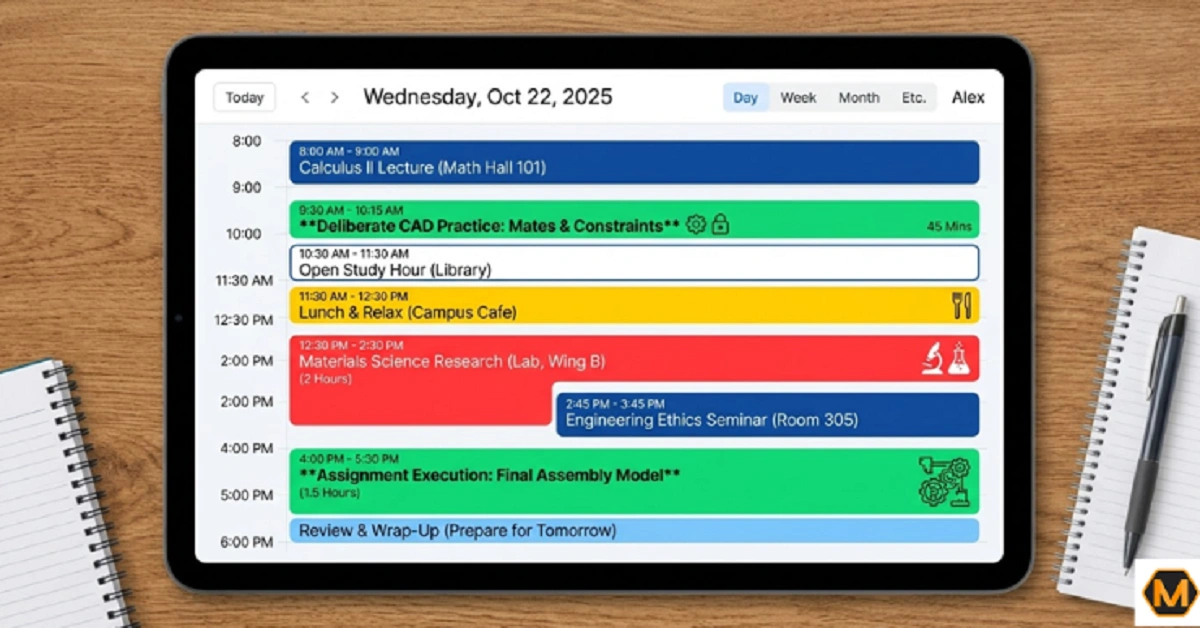
Treat these sessions as mandatory appointments with your future engineering self. Simultaneously, prioritize your assignments based on weight and deadline proximity. Be realistic about how long a complex model will take to build correctly, factoring in inevitable setbacks. The biggest time drain in CAD is often fixing fundamental parametric issues later in the design process.
The Role of Smart Academic Assistance: A Strategic Partner
Despite the best planning, engineering students often hit bottlenecks. A particularly intricate assembly might refuse to behave, a simulation might persistently fail, or you simply might run out of hours in the week. Recognizing these moments and seeking specialized, ethical support is a sign of strategic maturity, not weakness.
For complex engineering design challenges, specialized resources can be crucial. If you’re struggling to understand assembly hierarchies, correct mate errors, or interpret FEA simulation results within SolidWorks, seeking dedicated, professional Myassignmenthelp services, especially specialized SolidWorks assignment help, can offer significant clarity. These services are invaluable not for getting someone else to do your work, but for receiving focused guidance and understanding best practices from experienced professionals. Think of it as specialized tutoring that directly impacts your academic output and technical skill development. This targeted support can bridge critical gaps in your software understanding and practical application, ensuring you’re not just completing assignments but truly learning the intricacies of powerful tools like SolidWorks.
Conclusion: Embracing the Continuum of Learning
Rethinking your approach to engineering studies means acknowledging that software mastery isn’t a single class but an ongoing process throughout your degree and professional career. It’s about building a robust workflow that balances deep technical knowledge with effective academic management. This requires consistent effort, smart prioritization, and the strategic utilization of resources, whether it’s specialized software support or general academic guidance.
Frequently Asked Questions (FAQ)
Q1: How much time should I dedicate daily to mastering CAD software?
A: There isn’t one answer that fits everyone. Consistency is far more impactful than marathon sessions. For engineering students balancing multiple subjects, aim for 30–60 minutes of deliberate practice on most days. This might include exploring a new feature, modeling a complex component, or troubleshooting an error. Make this practice structured, focusing on understanding principles rather than just following tutorials.
Q2: Are online assignment solution services ethical for engineering students?
A: Yes, when used ethically. The key is how you utilize the support. It becomes unethical if you represent another person’s work as your own. Ethical use involves:
- As a Learning Tool: Reviewing solved examples to understand complex problem-solving steps.
- Clarifying Concepts: Using tutoring services to grasp difficult engineering theories or specific software functions.
- Reference and Guidance: Seeking expert insights on best practices for design, modeling, or simulation within specific software.
Ultimately, the goal is always to improve your own understanding and skill.
Q3: My university offers CAD labs, isn’t that enough for software mastery?
A: University CAD labs are excellent for learning the initial interface, basic commands, and completing defined assignments. However, true industry-level mastery requires much more depth. Think of the labs as the foundation; building the rest of the house requires independent practice.
About The Author
I’m Ruby Walker, an academic consultant and content strategist associated with MyAssignmentHelp. With a background in educational psychology and digital learning, I focus on helping students navigate the complexities of modern higher education—from mastering technical software like SolidWorks to developing sustainable study habits.